Skip to content

Everything you need to get a contract read, sent and signed

Papierwerk covers the whole path from a PDF in your downloads folder to a signed document with proof. Here is what happens at each step, and what you get.

Six steps, one signed PDF

  1. 1

    Upload

    Drop in a PDF of up to 25 MB and 100 pages. The file is stored and read straight away.

  2. 2

    Review

    Papierwerk shows the parties, key terms, a summary and the clauses worth a second look. You correct anything that is off.

  3. 3

    Place fields

    Fields are suggested at the signature lines. Drag them, add more, assign each to the right person.

  4. 4

    Send

    Add up to five signers, choose whether they sign in order, write your message and send. You sign first with your saved signature.

  5. 5

    Sign

    Each signer opens their personal link, reads a plain summary and signs. No account needed.

  6. 6

    Seal

    Papierwerk stamps the signatures onto the document, adds a certificate of completion and emails everyone the signed PDF.

Upload a contract. Papierwerk reads it for you.

Drop in any PDF and within a minute you get the parties, the dates, the amounts and a plain summary, next to the document itself. Every value can be corrected before anything goes out.

  • Document type, parties, VAT numbers and representatives
  • Key terms: effective date, term, notice, fee, payment, liability, governing law
  • A two-sentence summary of who agrees to what
  • Every extracted value is editable, nothing is locked in
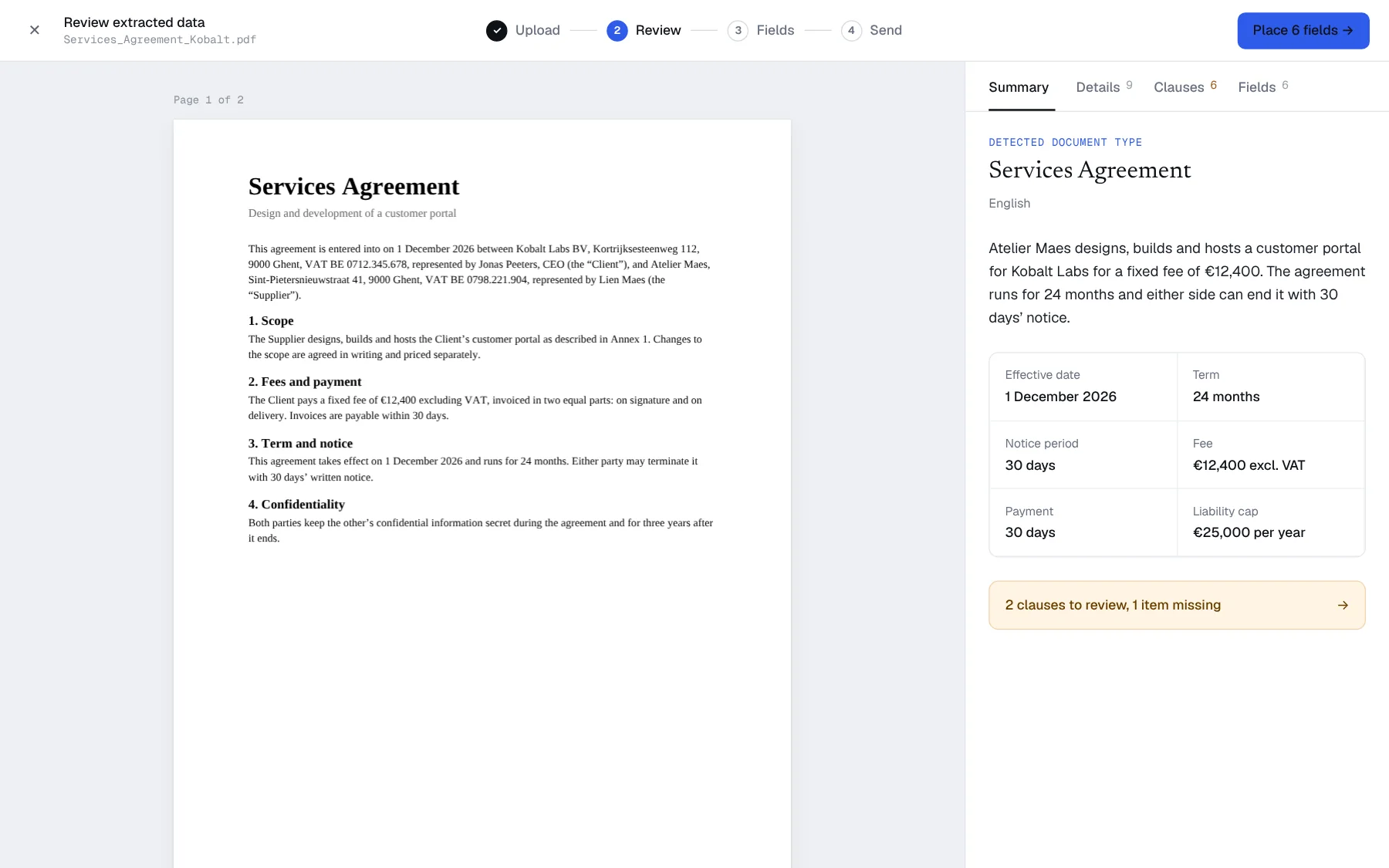
Papierwerk review screen: the uploaded contract on the left, extracted parties, key terms and a summary on the right

See the clauses worth a second look before you send.

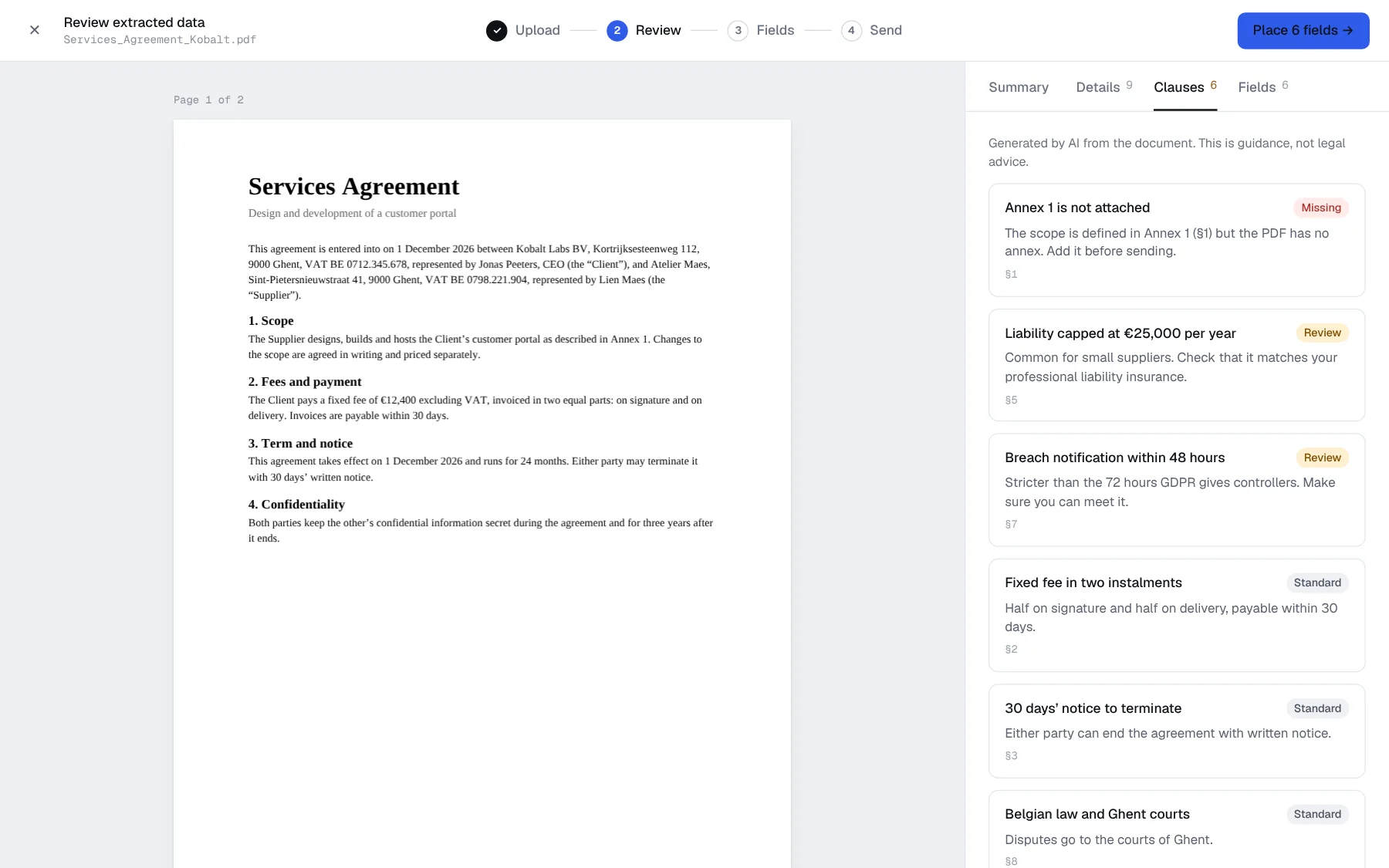
Papierwerk flags what is missing, what deserves a closer read and what is standard, each with a reference to the section. It is guidance for a busy owner, not legal advice.

  • Missing: annexes that are referenced but not attached
  • Review: caps on liability, short notice periods, unusual penalties
  • Standard: the clauses you can stop worrying about
  • A short explanation for every flag, with the section it comes from
Clause check listing a missing annex, two clauses to review and three standard clauses, each with an explanation

Signature fields appear where the signature lines are.

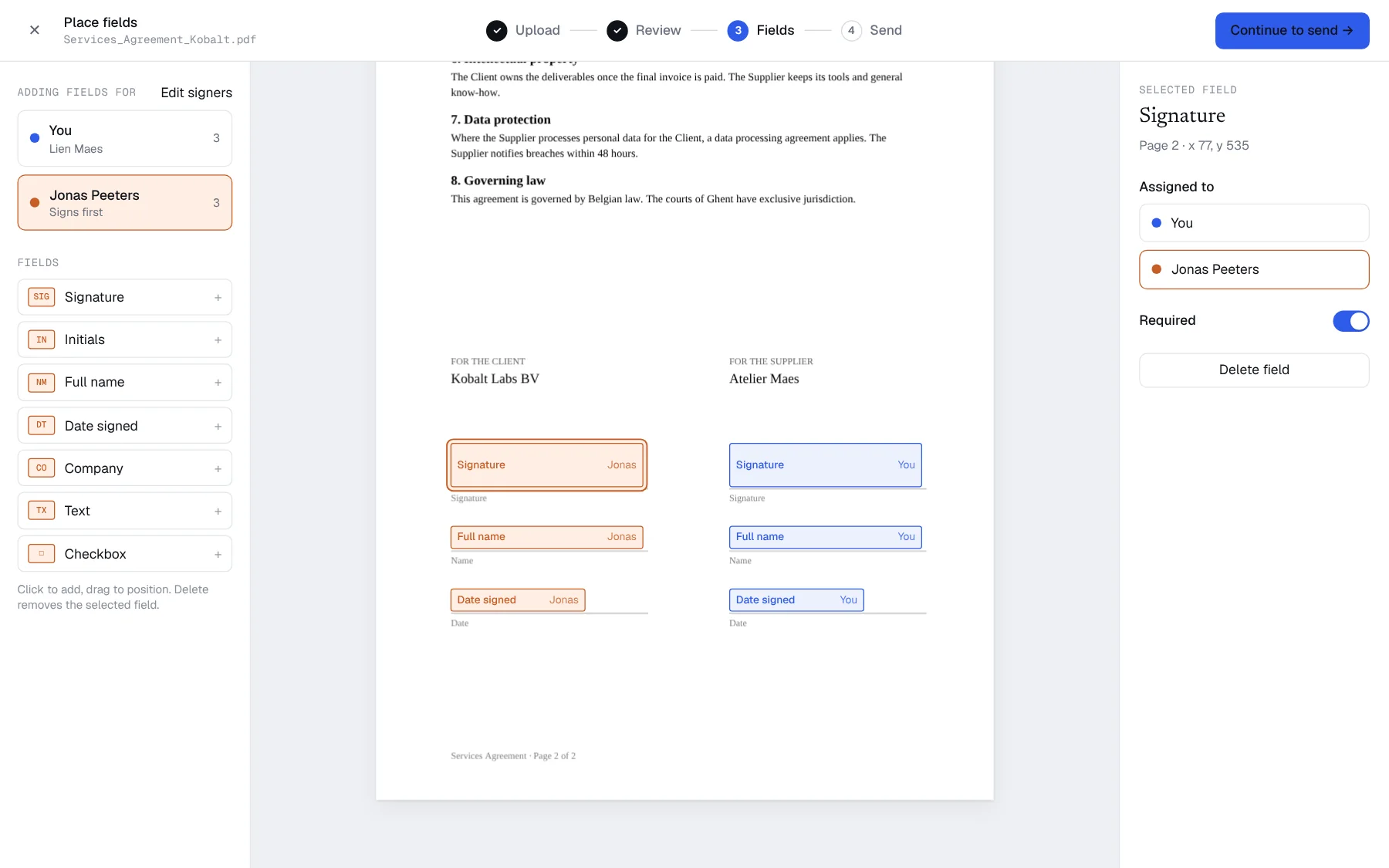
Papierwerk finds the signature blocks, matches them to the people involved and places the fields for you. Drag them where you want them, or add your own.

  • Signature, initials, full name, date, company, free text and checkbox
  • A colour per signer, so you always see who fills in what
  • Required or optional per field, reassign with one click
  • Works on the real PDF, page by page, on any page size
Field editor showing signature, name and date fields for two signers placed on the signature block of the contract

Up to five signers, all at once or in order.

Add everyone who has to sign. Send to all of them right away, or let each person get the document after the previous one has signed.

  • Personal signing link per person, with its own expiry
  • Sign in order: the next signer is emailed automatically
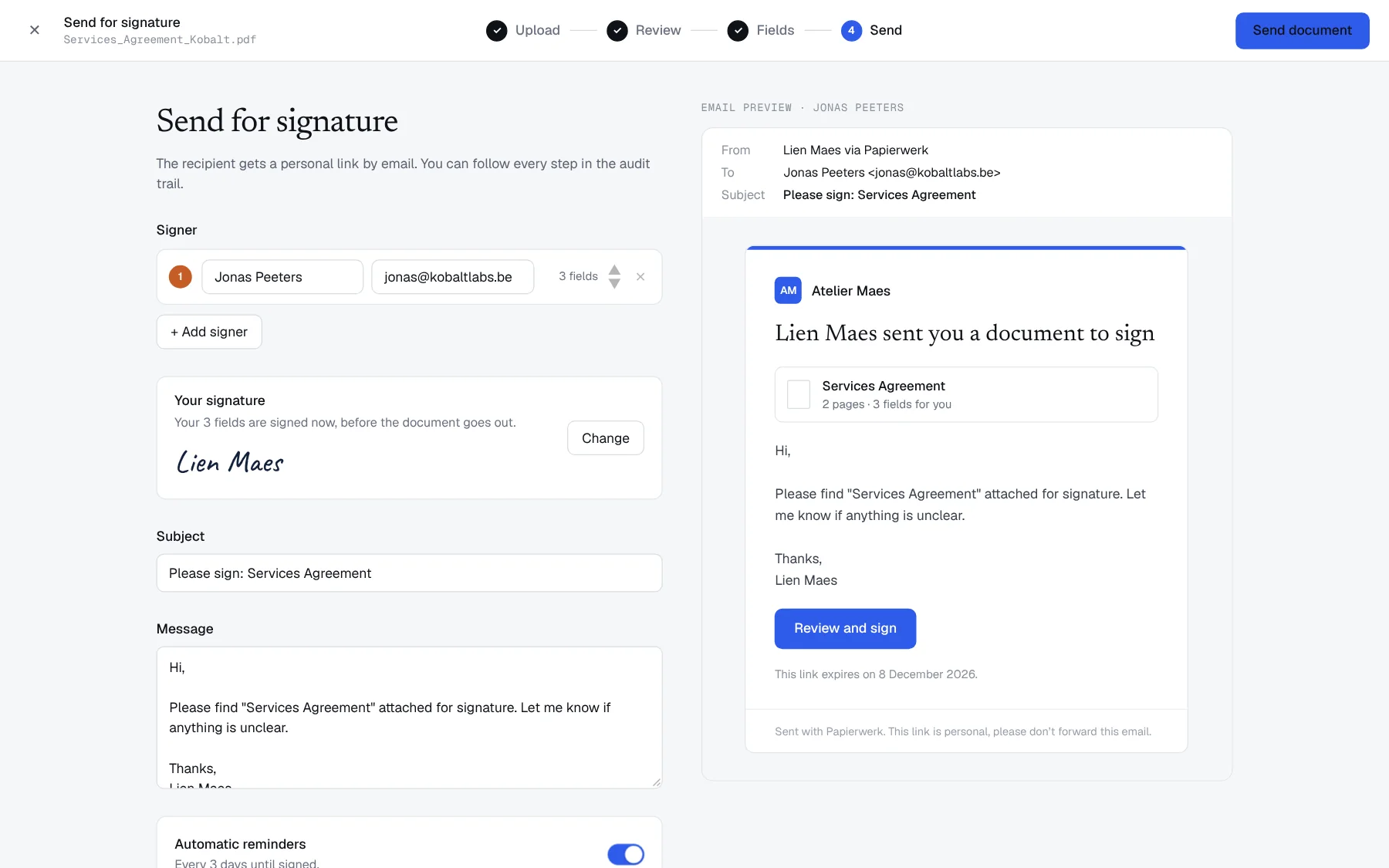
  • You sign first with your saved signature, before it goes out
  • Write your own message and see the email before it is sent
Send screen with the signers, a personal message, reminder and expiry options and a preview of the email

Signing takes a minute, and nobody needs an account.

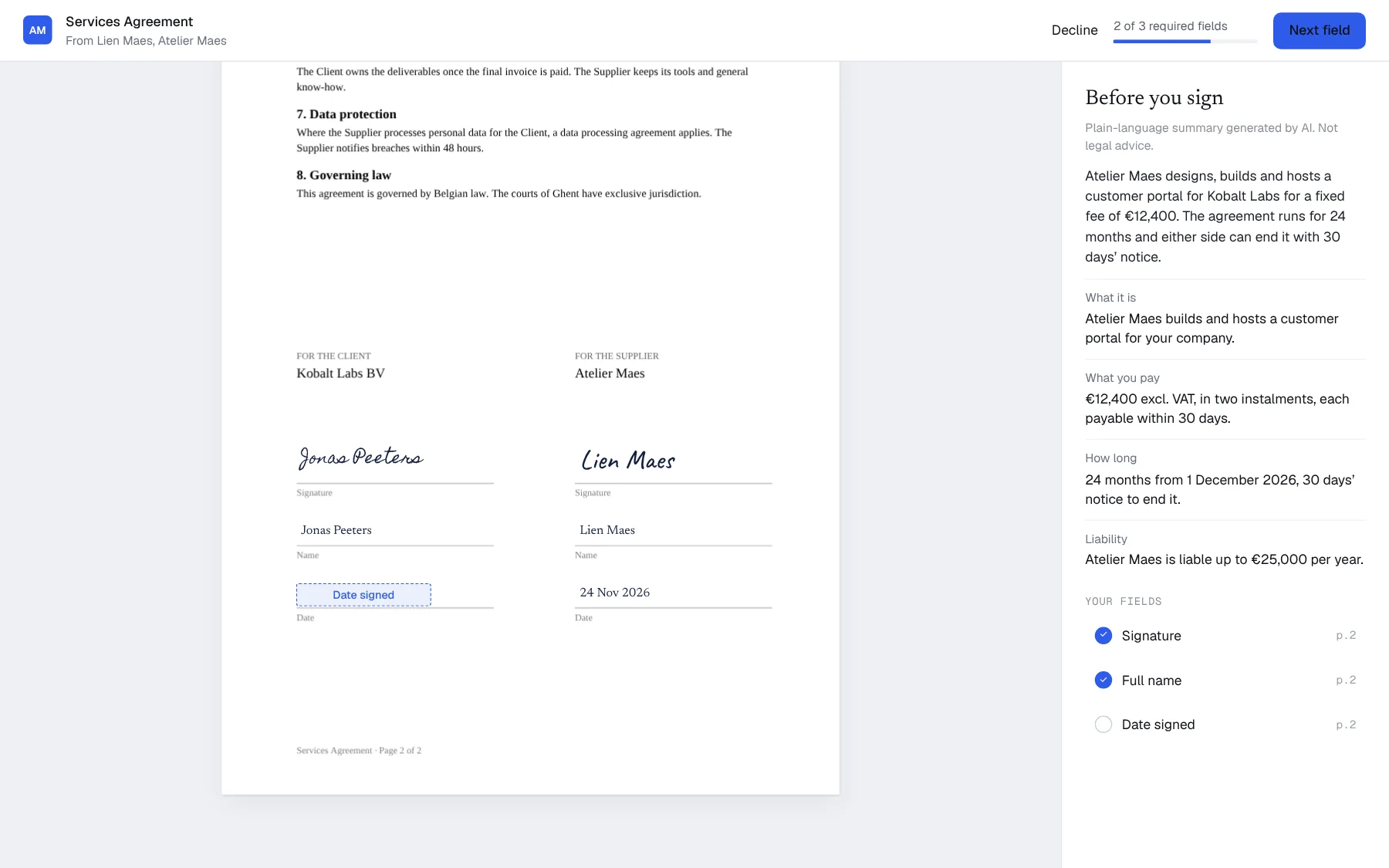
Signers open their link, read a plain-language summary of what they are agreeing to, and sign with a drawn or typed signature on their phone or computer.

  • A summary of the agreement written for the person signing
  • Progress bar and a “next field” button that walks through the fields
  • Draw or type a signature, with handwriting styles
  • Decline with a reason if something isn’t right
Signing page: the contract with a drawn signature and typed name filled in, and a plain-language summary beside it

Always know who has signed and who is next.

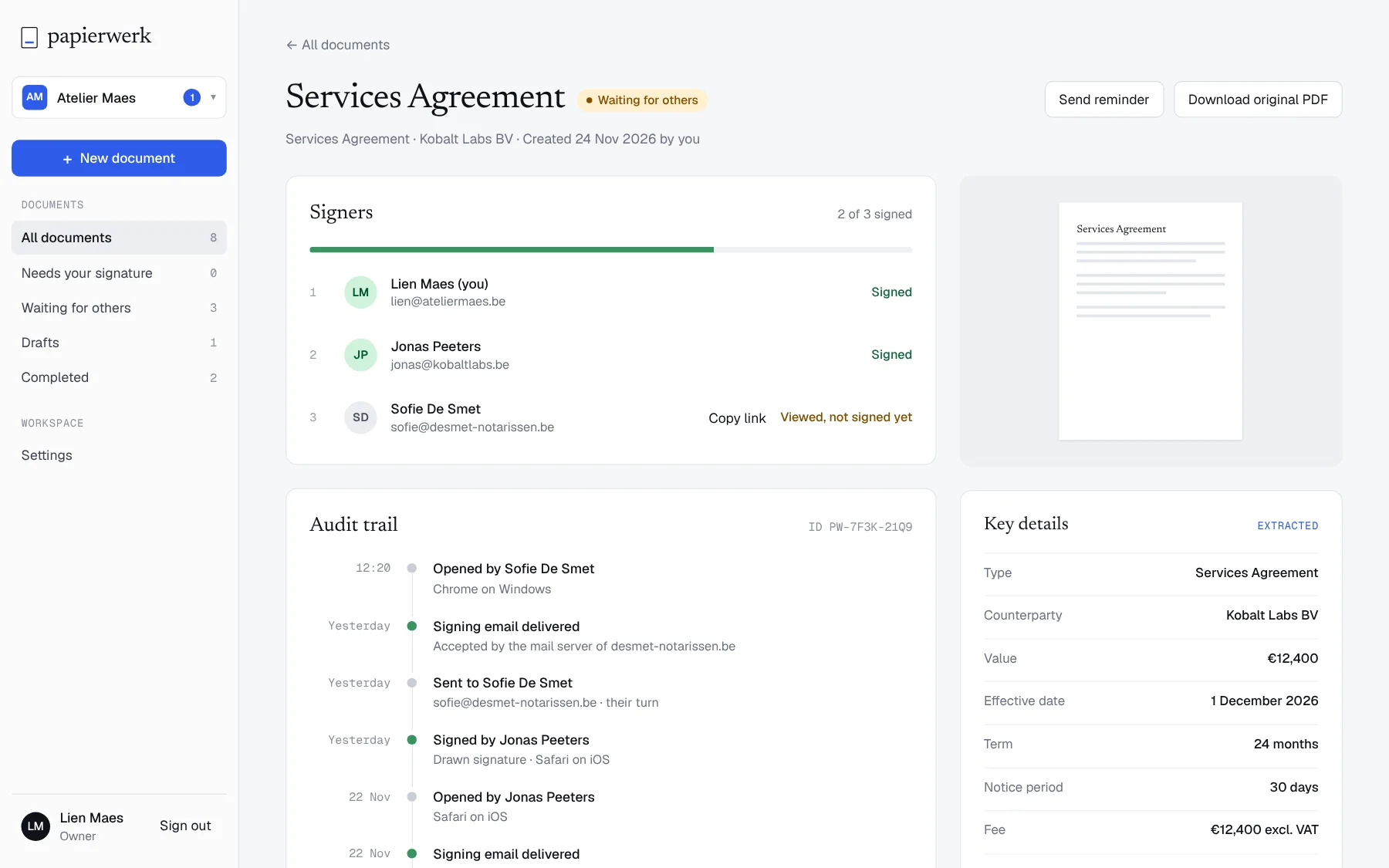
Each document has its own page with the status per signer and a time-stamped audit trail of everything that happened.

  • Uploaded, sent, opened, signed, completed: all time-stamped
  • Email delivery tracked: delivered, delayed or bounced
  • Automatic reminders every 3 days, or send one yourself
  • Links expire after 7, 14 or 30 days, you choose
Document page with the status of three signers, a progress bar and an audit trail of everything that happened

One signed PDF, with a certificate of completion.

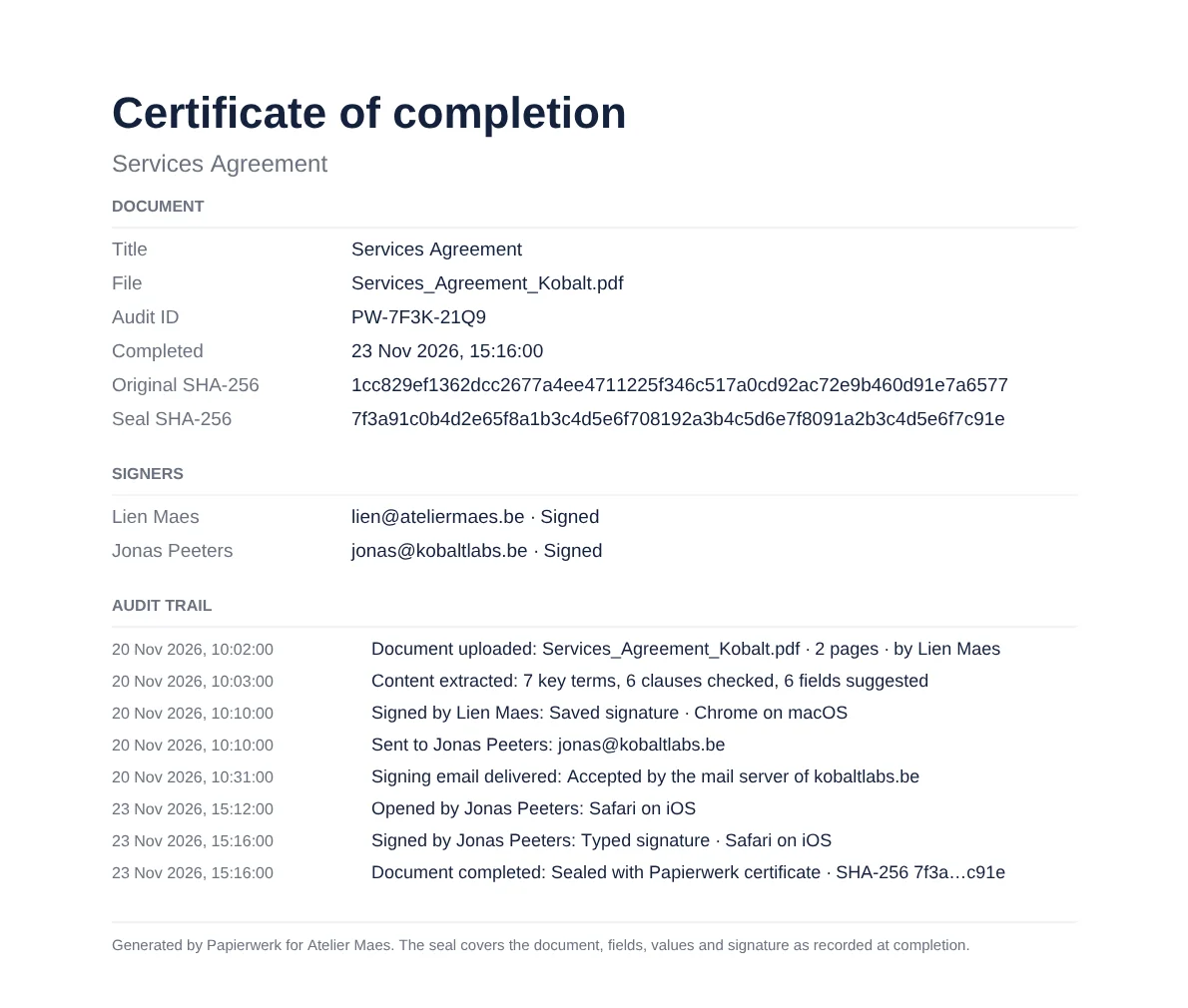
When the last person has signed, Papierwerk stamps every signature onto the original pages and adds a certificate page with the full audit trail and a SHA-256 seal. Everyone gets the file.

  • Signatures and filled-in fields placed exactly where they belong
  • Certificate with signers, audit trail and the SHA-256 of the original file
  • A seal over the document, fields and signatures at the moment of completion
  • Download from the document page, or from the email
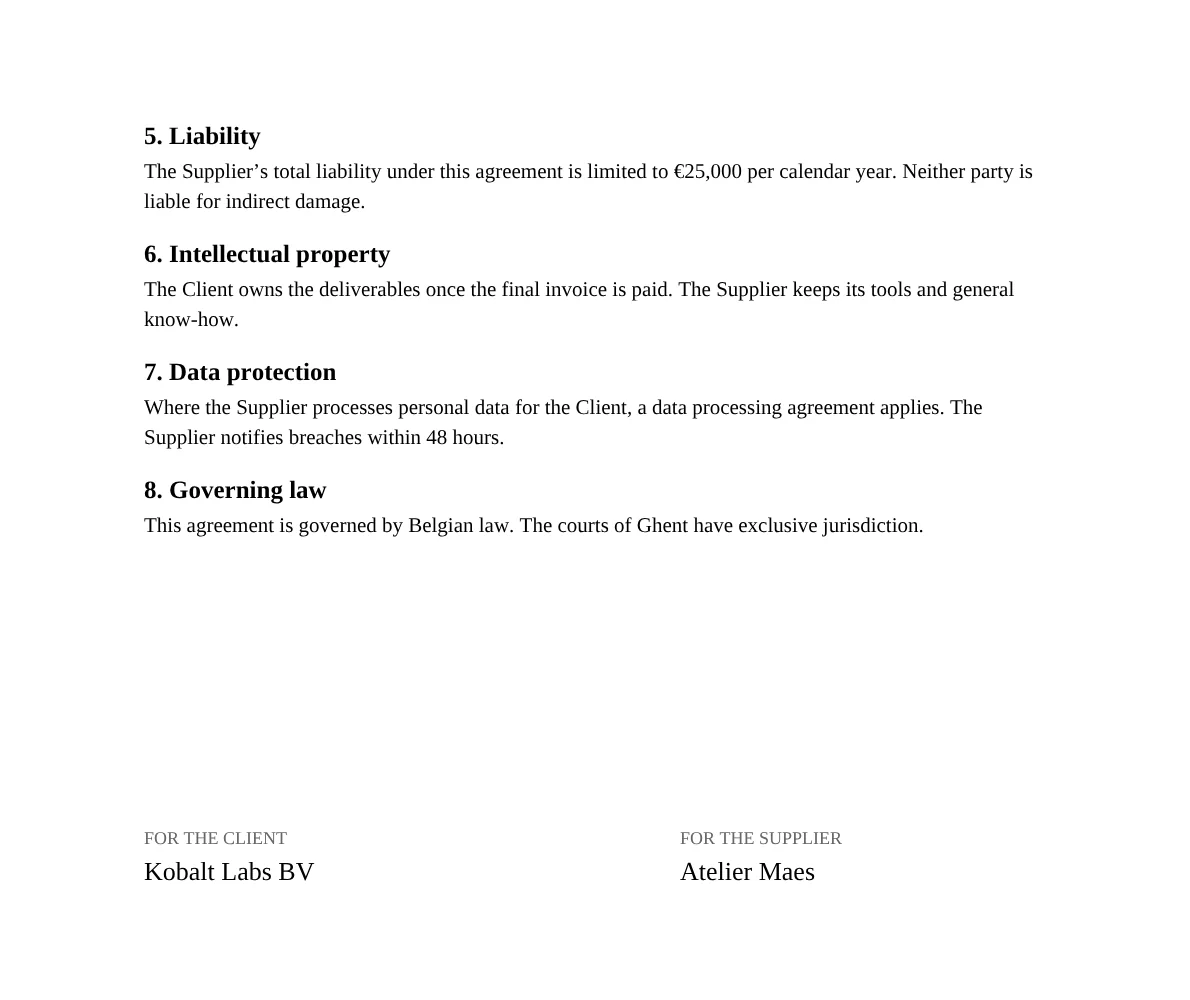
A page of the signed contract with the typed signatures of both parties above the signature lines
Certificate of completion with document details, signers, SHA-256 hashes and the full audit trail

Your colleagues, your documents, one shared list.

Create an organization for your company and invite your team. Everyone sees the same list of documents. Work for several companies? Add more organizations and switch with one click.

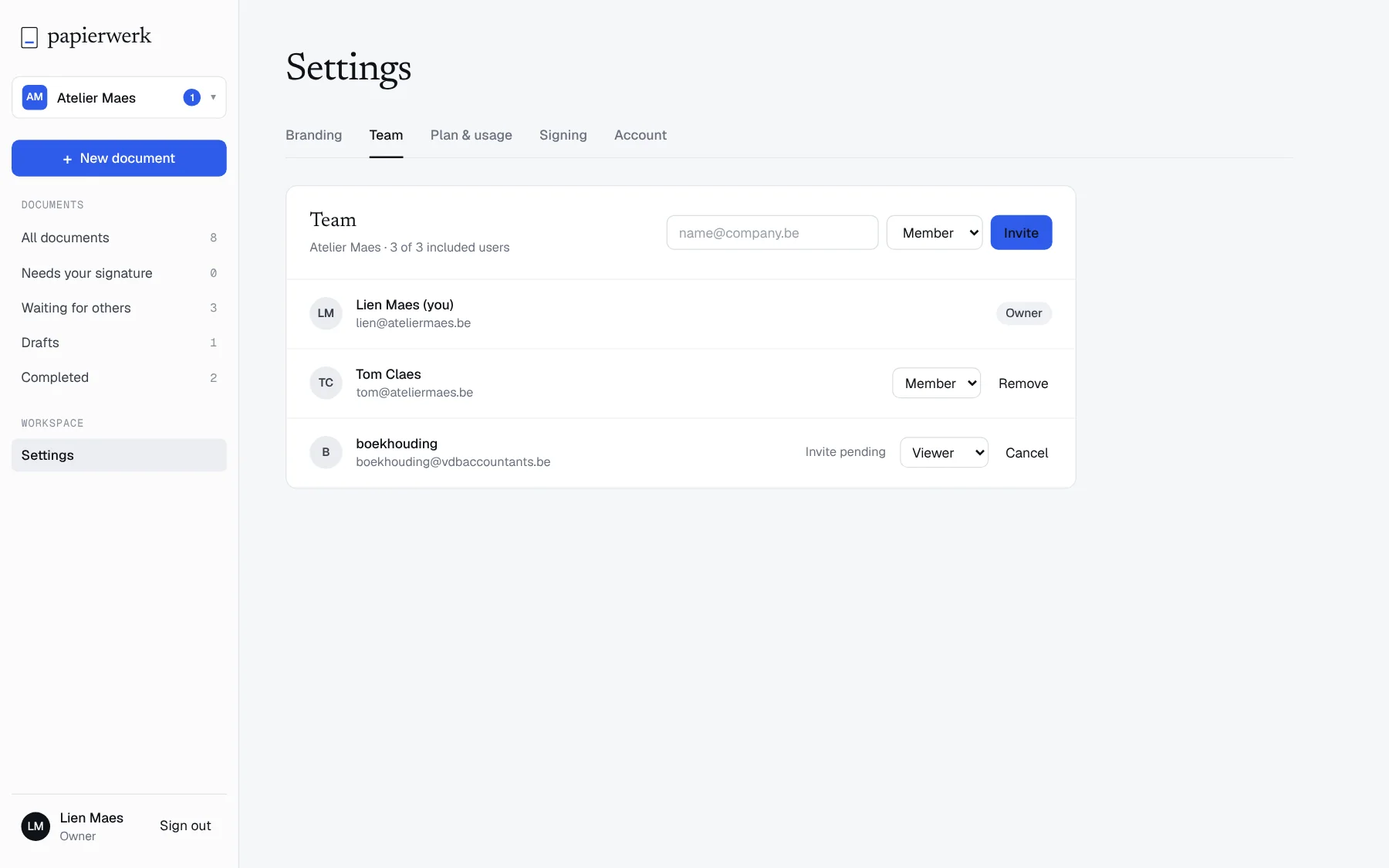
  • Roles: owner, member and viewer
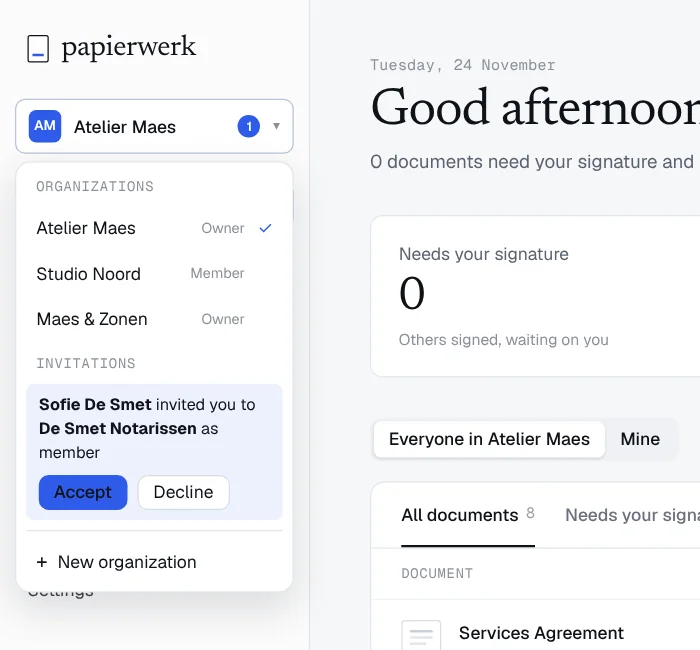
  • Invite by email; existing users accept from the organization menu
  • Filter on “Mine” or see everyone’s documents
  • Separate documents, team and branding per organization
Team settings with an owner, a member and a pending invitation, each with their role
Organization menu listing three organizations and a pending invitation to join a fourth

Every feature at a glance

Reading and review

  • Automatic extraction. Parties, VAT numbers, representatives, dates, amounts and key terms are pulled out of your PDF.
  • Plain-language summary. A short summary for you, and a version written for the person signing.
  • Clause check. Missing, to review or standard, with a reference to the section.
  • Editable results. Correct any value or the document title before you send.
  • Works on any PDF. Up to 25 MB and 100 pages, any page size, rotated pages included.

Fields and signers

  • Suggested fields. Fields are placed next to the signature lines Papierwerk finds, assigned to the right person.
  • Seven field types. Signature, initials, full name, date, company, text and checkbox.
  • Drag and drop editor. Move, delete, make required or optional, reassign to another signer.
  • Up to five signers. Each with their own colour, fields and personal link.
  • Signing order. Send to everyone at once, or one after the other.
  • Your own signature. Draw or type it once; it is signed onto your fields before the document goes out.

Signing

  • No account needed. Signers use the link from their email on any device.
  • Draw or type. Mouse, trackpad, finger or keyboard, with handwriting styles for typed signatures.
  • Guided. A progress bar and a next-field button walk people through.
  • Decline with a reason. The sender is told straight away and the document stops.
  • Your look. Your organization’s name and colour on the emails and the signing page.

Sending and tracking

  • Your message. Write your own subject and message and preview the email first.
  • Automatic reminders. Every 3 days to whoever still has to sign, or send one by hand.
  • Link expiry. 7, 14 or 30 days. Expired links stop working and the document is marked as expired.
  • Delivery tracking. Delivered, delayed, bounced or marked as spam appears in the audit trail.
  • Live status. See per signer whether they have been emailed, opened the link or signed.

Proof

  • Audit trail. Every step with time, browser and what happened.
  • Signed PDF. Signatures stamped onto the original pages.
  • Certificate of completion. Signers, audit trail and file hashes on a page at the end.
  • SHA-256 seal. Computed over the document, fields, values and signatures at completion.
  • Original kept. The uploaded file stays available next to the signed version.

Teams and organizations

  • Shared document list. Everyone in an organization sees and can pick up each other’s documents.
  • Roles. Owners manage the organization, members create and send, viewers only read.
  • Several organizations. Belong to more than one and switch from the sidebar.
  • Invitations. By email, accepted from the organization menu, or on sign-up for new users.
  • Plan and usage. See your AI credits, documents and users this month at any time.

Account and security

  • Verified email. Sign-up needs a confirmed email address.
  • Password reset. A reset link by email, valid for 10 minutes.
  • Change password or email. From your settings, with your current password. Sign out other devices if you like.
  • Isolated organizations. Every request is checked on the server against your membership.
  • Secret signing links. Long random tokens, personal per signer, with an expiry.

What Papierwerk doesn’t do (yet)

  • Qualified electronic signatures and itsme. Signatures are simple electronic signatures with an audit trail.
  • More than five signers on a document.
  • Single sign-on and two-factor authentication.
  • The app, signing page and emails in other languages than English.
  • Your own logo on the emails and signing page (your name and colour are supported).

Read more under security and legal validity.

Try it on a real contract.

Register free